
Because work is
enough work already.
Let’s talk

Get the right help.

Five services. Start with the problem you need solved, and we’ll combine related work into one clear scope.

Hands sorting receipts into colored hanging folders beside a laptop

Get your information together.

Business Information & Digitization

Business files, paper records and employee knowledge, organized into a system your team can use. We make the records and knowledge your business runs on easier to find, use and maintain.

What does this look like?

Illustrative example · A local service business with years of scattered job records.

The starting point

Signed forms live in filing cabinets, job photos on phones and customer details in several spreadsheets. When a customer calls about an older job, someone searches three places or asks the owner.

What we do together

  1. Agree which records the team needs most, and how they need to find them.
  2. Sort the paper and digital records. Scan and index the agreed paper files, and fix duplicates with you.
  3. Set one way to name and file new records, and walk the team through it.

What you receive

  • An organized digital collection of the agreed records
  • Searchable scans and a clear customer and job filing structure
  • Simple instructions for keeping it that way

What daily use looks like

A customer calls. The office opens that customer’s job folder and finds the documents and photos together. AI is optional; the organized information is useful on its own.


Two people mapping a workflow with colored sticky notes beside a laptop

Get ready for useful AI.

Business Modernization & AI Readiness

A practical plan for better information, connected systems and a useful first AI project. You’ll understand what needs to change, in what order, and who will do it.

What does this look like?

Illustrative example · A business entering the same job information into several tools.

The starting point

Customer details arrive by email, appointments live somewhere else, and finished jobs get typed in again for invoicing. The team wants AI to help, but the records don’t agree and nobody has mapped the whole process.

What we do together

  1. A free first conversation to find the workflow worth fixing.
  2. If it needs a deeper look at your systems and people, we agree a paid discovery scope and fee first.
  3. Map the workflow, the information and the tools, and find the gaps.

What you receive

  • A workflow map and clear findings
  • Recommended priorities, in order
  • An implementation estimate, approved separately

What daily use looks like

Everyone knows which system owns the customer record, where job status lives and how information moves to the next step. Then the first AI project has solid ground.

A hand holding a phone with a task notification at an office desk while a folder is handed over

Put AI to work.

AI Assistants, Managed Office Assistance & Automation

Assistants and workflows built around your business, your information and the people responsible for decisions. We build it and hand it over, or, as a proposed pilot, help run it with your own team.

What does this look like?

Illustrative example · A service business routing incoming requests to its office and field team.

The starting point

Requests land in a shared inbox. Someone reads each one, finds the customer record, chases missing details and decides who should act.

What we do together

  1. Pick one type of request to pilot, and define a good handoff.
  2. Connect the approved information, tools and responsible people.
  3. Build a workflow that summarizes each request, finds the record and prepares the next step for review. Test it hard before launch.

What you receive

  • A scoped assistant connected to agreed information and tools
  • A work queue of requests, proposed actions and owners
  • Approval rules and instructions for exceptions

What daily use looks like

A customer reports a problem. The assistant summarizes it and finds the job. The office approves the next step. If a visit is needed, a named team member is assigned, does the work and records the result.

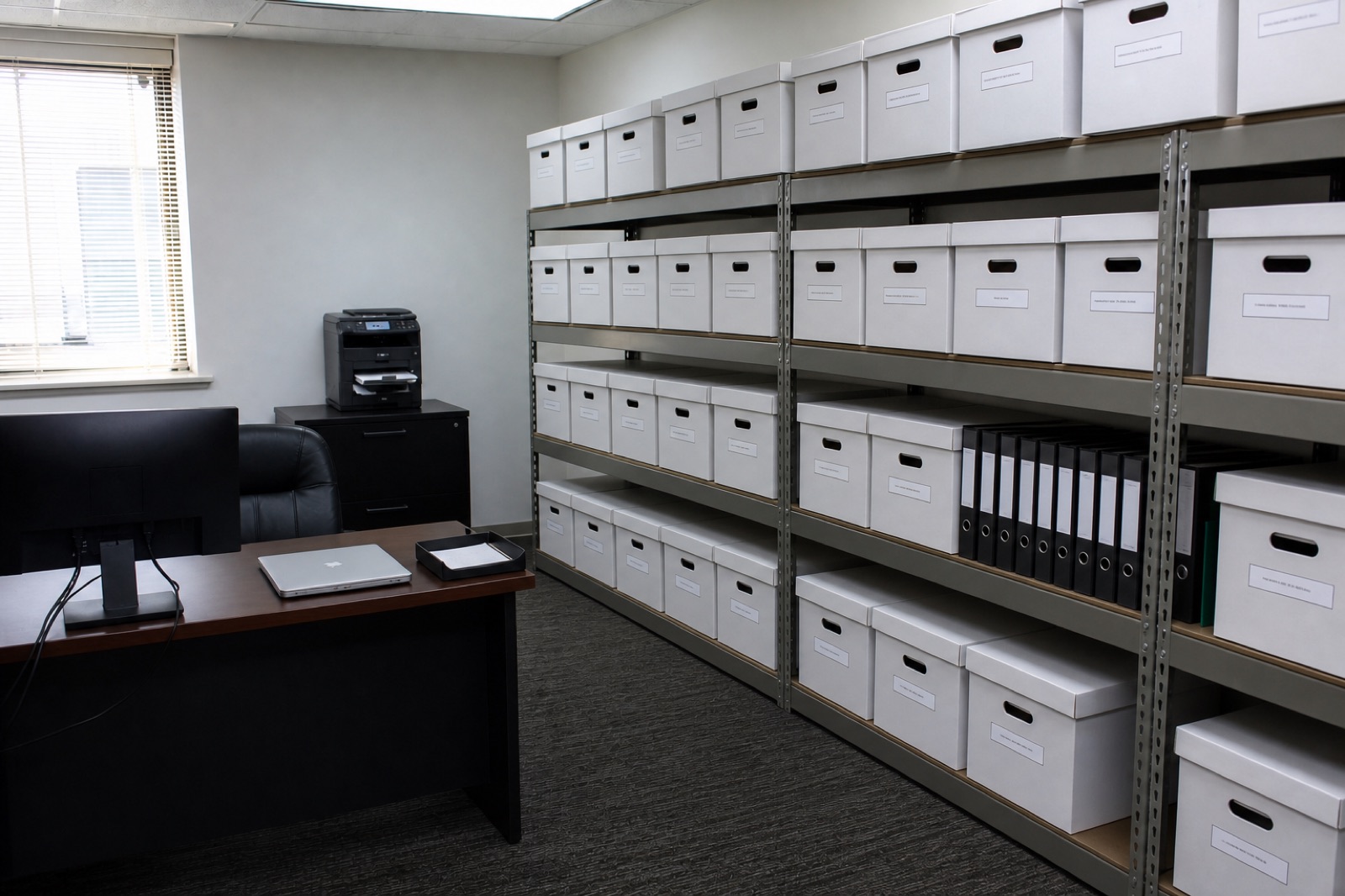
A back office with matching labeled file boxes on shelves and a clear desk

Get the office together.

Office & Workspace Organization

Commercial filing, desks, supply rooms and stockrooms arranged around the people who use them. The physical space your team works in, made easier to work with.

What does this look like?

Illustrative example · A small office whose supply room and paperwork have become hard to manage.

The starting point

Staff buy supplies the office already has because nobody can find them. Active paperwork is mixed with old files, and shared desks collect things with no home.

What we do together

  1. Learn how the team uses the space and agree which areas are included.
  2. Sort supplies and paperwork, with your decisions on what stays, moves or goes.
  3. Group things by how they’re used, then label every location and agree a simple reset routine.

What you receive

  • An organized workspace
  • Labeled storage and filing areas
  • Practical instructions for keeping them usable

What daily use looks like

Anyone can see where supplies belong, check what’s there and put things back. Active paperwork has a home instead of becoming another desk pile.

A hand returning a binder to a tidy row of labeled binders while holding a checklist

Keep it together.

Ongoing Organization & Support

An optional service contract to keep the agreed records, spaces and technology maintained as your people and systems change. Scope, owners and frequency are agreed up front.

What does this look like?

Illustrative example · Keeping a finished information and assistant project useful as the business changes.

The starting point

The records are organized and an assistant runs on approved procedures. Then new documents keep arriving, people change roles and some procedures go out of date.

What we do together

  1. Agree what’s covered, the review schedule and who owns each task.
  2. We organize incoming records and keep procedures current; Innovation Theory maintains the assistant and integrations.
  3. You approve changes to procedures and access; bigger additions get their own scope.

What you receive

  • A maintenance schedule and named contacts
  • A record of updates, issues and decisions
  • Response expectations written into the contract

What daily use looks like

The team knows where new information goes and who to call when a workflow needs attention. Scheduled reviews catch what’s gone stale.

Not sure where to start?

Tell us what’s getting in the way. We’ll help you decide which service fits, or combine them into one clear scope.